How to Turn a Few Photos Into a Week of Posts
You don't need a photo a day. You need one good photo session and a system for cutting it into pieces. A handful of strong shots — a product, your hands at work, a behind-the-scenes corner of your space — can carry a full week of posts if you change the angle, the caption, and the format each time. The work isn't taking more pictures. It's deciding, before you post, what each one is *for*.
How many photos do I actually need for a week of posts?
Fewer than you think. Aim for 5 to 8 usable photos from a single 20-minute session. A "usable" photo is one you'd be happy to see at the top of a feed — in focus, decent light, no clutter you have to apologize for. From those 5 to 8, you can comfortably make a week of content because each photo can do more than one job.
And you don't need to post daily to grow. A Buffer analysis of over 2 million Instagram posts from 100,000+ accounts found that posting 3 to 5 times per week more than doubles follower growth compared with posting once or twice — enough to build momentum without letting quality slip. That's the target most small businesses should hit, and 5 solid photos used well gets you there with room to spare.
So the math is simple. You're not trying to fill 7 empty slots with 7 new things. You're taking 5 to 8 raw images and 1 real update from your week, then mixing them.
What kinds of photos should I shoot so they stretch further?
Variety is what lets one session cover a week. If every shot is the same product on the same white background, you'll run out of angles by Tuesday. Shoot for range instead. When you set up your session, capture a few different *types*:
- The hero shot. The clean, flattering photo of the thing itself — the dish, the product, the finished haircut. This is your anchor.
- The detail. A close crop. Texture, stitching, steam, a hand on a tool. Details read completely differently from wide shots and feel like a separate post.
- The context shot. The thing in its world — on a table, in someone's hands, on the shelf where it lives. This sells the feeling, not just the object.
- The behind-the-scenes. You mid-task, your workspace, the mess before the clean result. People follow small businesses for the human part, and this is it.
- The before/after or in-progress. Two states of the same thing. This alone can be a carousel, a Reel, and a single post.
You don't need a photographer for any of this. A phone in good window light, a clean-ish background, and a wipe of the lens cover most of it. Shoot a few extra frames of each — you'll cull later.
How do I turn one photo into several different posts?
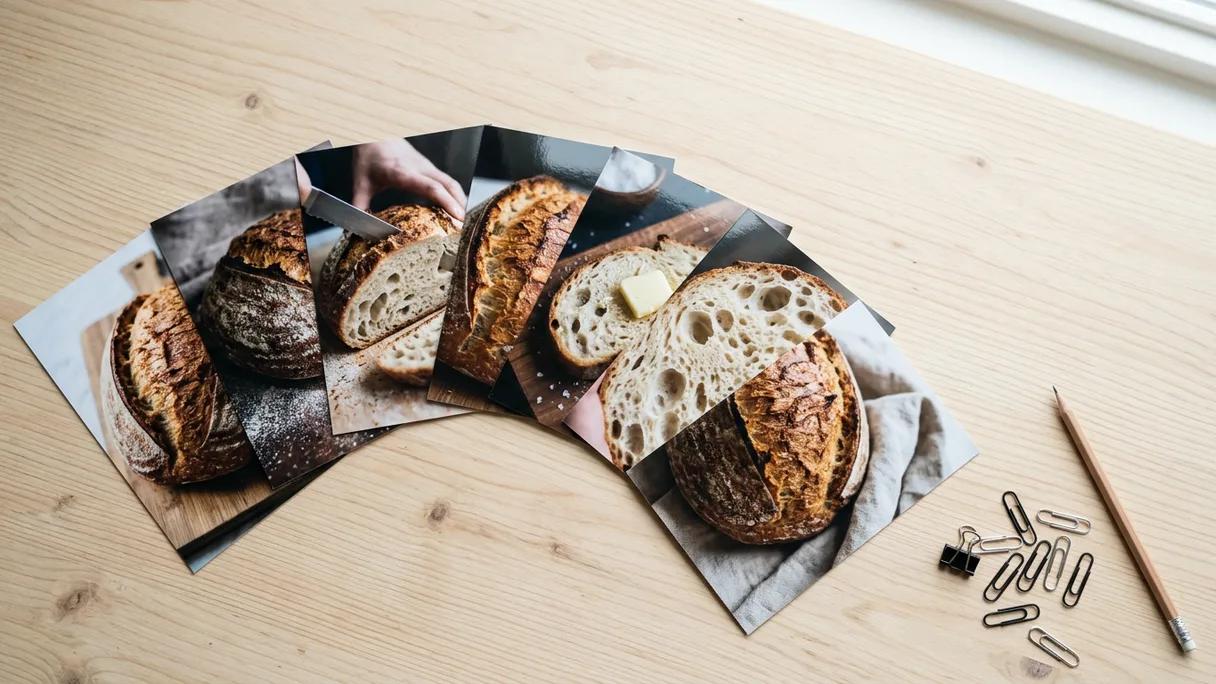
The trick is that a post isn't a photo. A post is a photo *plus an angle*. The same hero shot becomes three different posts depending on what you say next to it and how you crop it. Take one image of, say, a loaf of sourdough and run it through different jobs:
- Educational. "Here's why we proof our dough for 18 hours." Same photo, a caption that teaches something.
- Behind-the-scenes. "4:30am. This is what fresh actually costs." Same photo, a human angle.
- Promotional. "Saturday loaves are up for pre-order — link in bio." Same photo, a direct ask.
- Social proof. "A regular told us this is the only bread her kid will eat. We'll take it." Same photo, a customer story.
- Question/engagement. "Crust people or crumb people? Settle it in the comments." Same photo, a prompt.
That's five posts from one image, and none of them feels repetitive because the reader gets a different thing each time. Multiply that across your 5 to 8 photos and you have far more than a week. The constraint stops being "what do I post" and becomes "which of these do I post first."
How do I get videos out of a photo session too?
Short video tends to pull more reach than static images on most platforms right now, so it's worth squeezing some out of the same session. Two easy paths:
- Shoot 10 seconds of video alongside each photo. Before you take the still, hit record and pan slowly across the same scene, or film the moment in motion — pouring, plating, wrapping, the reveal. Ten seconds is a Reel. You're already standing there.
- Turn stills into motion. A set of 4 to 6 photos becomes a slideshow Reel set to trending audio. A before/after pair becomes a two-frame transition. You don't need footage for everything — a sequence of good stills, cut to a beat, performs.
Don't overthink production. A steady phone, natural light, and one clear subject beat anything fussy. The goal is *another format from the same raw material*, not a film.
How do I plan the week so it doesn't feel random?
Batch the thinking, not just the shooting. After your session, sit down once — 30 minutes — and assign each photo a day and a job. A simple grid does it: one column for the day, one for the photo, one for the angle (educational, behind-the-scenes, promo, proof, question), one for the format (single image, carousel, Reel). This is content batching, and it works because deciding seven things at once is far less draining than deciding one thing seven times. It also keeps the week balanced — you'll notice if four of your five posts are sales pitches and fix it before it goes out.
You're not creating a week of content. You're cutting one session into a week of pieces, then deciding what each piece is for.
Keep a rough rhythm so you don't lean on one note. A workable week: Monday educational, Wednesday behind-the-scenes, Friday promo or a customer story, with a Reel and a question slotted in where they fit. You don't have to follow it religiously. You just need a default so the blank page never wins.
How do I keep the look consistent across all of them?
Consistency is what makes 5 unrelated photos feel like one brand. A few light rules go a long way, and none of them require design skills:
- Pick one light. Shoot the whole session in the same spot at the same time of day so the color and mood match.
- Edit the same way. Apply one filter or one set of adjustments to every photo from the batch. Phone editors let you copy settings across images.
- Crop on purpose. Decide on a frame — square for grid harmony, 4:5 portrait for feed real estate, 9:16 for Reels and Stories — and crop each photo into the format its post needs.
- Reuse a caption shape. A short hook, a line or two of substance, one call to action. When the structure repeats, the brand feels steady even when the topics vary.
This is also where most owners lose hours: the editing, resizing, and rewriting for each platform. Each network wants a different aspect ratio, a different caption length, sometimes a different tone. Doing that by hand for four platforms is the part that quietly eats the afternoon.
This is the gap Laspi Pro is built to close. You record a short weekly voice note about what's new and add a few photos from your phone; Laspi Pro turns that into a week of ready-to-publish posts — captions, formats, and image variations tailored to each platform. You review what it made, change anything you want, and publish. The shoot is still yours. The cutting-into-pieces is done for you.
What's the simplest version I can start this week?
If the full system feels like a lot, shrink it. Do this once and you'll have proof it works:
- Spend 20 minutes shooting 5 photos in good light — one hero, one detail, one context, one behind-the-scenes, one in-progress.
- Sit down for 30 minutes and assign each photo a day and an angle.
- Write five short captions using the same shape: hook, one real line, one ask.
- Crop each for where it's going. Schedule or post.
That's a full week from one afternoon. Do it again next week with a new session and you have a repeatable engine instead of a daily scramble. The owners who stay consistent on social aren't the ones with more time. They're the ones who stopped treating every post as a fresh emergency.
Frequently asked questions
- How many photos do I need for a week of social media posts?
- Five to eight usable photos from one short session is plenty. Because each photo can become several posts by changing the caption angle and the crop, you don't need a new image for every day. Aim for variety in the shoot — a hero shot, a detail, a behind-the-scenes, and an in-progress shot — so the photos stretch further.
- Can I really use the same photo more than once?
- Yes, as long as the angle changes. The same image can be an educational post one day, a behind-the-scenes post another, and a promotional post a third, because the reader gets a different message each time. Pair it with a different crop or format and it reads as a fresh post, not a repeat.
- What is content batching and why does it help?
- Content batching means creating and planning a block of content in one focused session instead of scrambling daily. It saves time, reduces decision fatigue, and makes consistent posting far easier. Shooting your photos and assigning each one a day and an angle in a single sitting is the core of it.
- How often should a small business post on social media?
- For most small businesses, 3 to 5 times per week is a sustainable target. A Buffer analysis of over 2 million Instagram posts found that this frequency more than doubles follower growth compared with posting once or twice a week, without sacrificing quality. Five good photos used across angles and formats easily covers that.
- How do I get videos out of a photo session?
- Film 10 seconds of video alongside each photo — a slow pan or the action in motion — and you have Reels from the same session. You can also turn a set of stills into a slideshow Reel with music. Short video usually earns more reach than static images, so it's worth the extra few seconds.
Sources
- Buffer, 2025 — A Buffer analysis of over 2 million Instagram posts from 100,000+ accounts found that posting 3 to 5 times per week is the sweet spot for growth, more than doubling follower growth rate compared with posting once or twice a week.