Ultralight Work Kit for Coffee Shops
Ever stared at your overstuffed backpack before heading to a coffee shop and thought, “There’s got to be a better way”? I’ve been there—lugging cables, chargers, and enough tech to outfit a small IT department. Spoiler: most of it never left my bag. After a couple of years working remotely from everywhere—airport lounges, noisy espresso bars, the occasional park bench—I’ve dialed in an ultralight setup that keeps me productive and sane (and leaves room for an emergency pastry).
Why Go Ultralight?
Let’s be honest: carrying less means you move faster, think clearer, and don’t look like you’re moving in for a three-day hackathon when you’re just grabbing a flat white. The right minimalist setup is about freedom—working anywhere, without the “digital nomad” drama or chiropractor bills.
“The first time I left my clunky charger and full-size keyboard at home, I panicked—until I realized I didn’t miss them at all.”
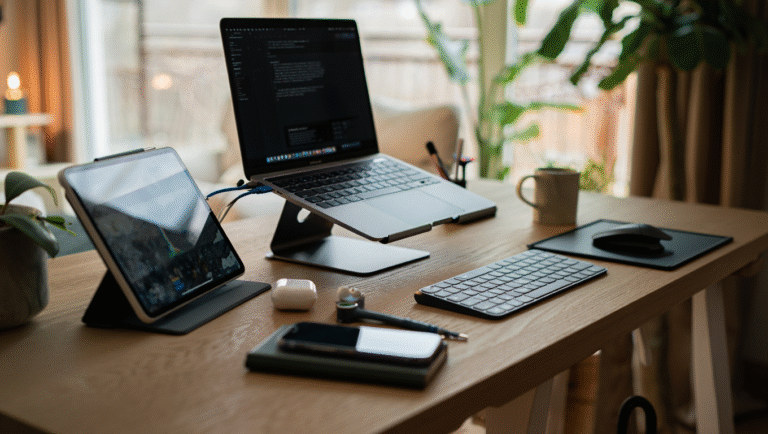
Here’s my proven, five-item mobile work kit. It all fits in a small everyday backpack—no need for a rolling suitcase or tactical vest. Let’s break it down, item by item.
Item 1: The Right Laptop
Laptop is obvious, but the right laptop is key. You want something light (under 3 lbs/1.4 kg), with all-day battery life (8+ hours real usage), and a great keyboard. After testing a bunch, I landed on a MacBook Air M2 (2.7 lbs/1.24 kg), but a Dell XPS 13 or Lenovo ThinkPad X1 Carbon are solid, too. The trick: don’t bring a power brick unless you absolutely need it.
- Weight: 2.5–3 lbs (1.1–1.4 kg)
- Battery: 8+ hrs real-world use
- Size: 13–14” sweet spot
Field Note:
I once spent five hours in a busy Tokyo café on a single charge, no outlets in sight. That’s the bar to aim for.
Item 2: Thin Laptop Stand
Hunching over a laptop all day is a recipe for regret. I use a MOFT Invisible Stand—it sticks to the bottom of my laptop, weighs basically nothing (3 oz/85 g), and folds flat. Anything bulkier is overkill for café hopping.
- Folds to 0.2” (5 mm) thick
- Supports up to 18 lbs (8 kg)
- No tools or extra bulk
Pro tip: If you’re tall, get a version that offers a steeper angle.
Item 3: Compact Keyboard & Mouse
Even great laptop keyboards get cramped after a while. Enter the compact Bluetooth keyboard and a tiny mouse. My picks:
- Keyboard: Keychron K3 Ultra-slim (1.06 lbs/480 g)
- Mouse: Logitech Pebble M350 (2.7 oz/76 g)
Both fit in a jacket pocket. No wires, no dongles (unless your laptop is dongle-dependent—see below). If you’re doing a lot of writing or coding, this will save your wrists.
Quick Table: Essential Specs
| Item | Model | Weight | Battery | Size |
|---|---|---|---|---|
| Laptop | MacBook Air M2 | 2.7 lbs | 15 hrs | 13.6” |
| Stand | MOFT Invisible | 3 oz | n/a | 0.2” thick |
| Keyboard | Keychron K3 | 1.06 lbs | 34 hrs | 11.8” |
| Mouse | Logitech Pebble | 2.7 oz | 18 mo | Tiny |
| Charger | Anker Nano II 65W | 3.8 oz | n/a | Palm-size |
| Privacy Screen | 3M Gold | 2 oz | n/a | Ultra-thin |
Item 4: Tiny Fast Charger
You don’t need a power brick the size of a sandwich. The Anker Nano II 65W is smaller than a deck of cards, charges everything (laptop, phone, headphones), and weighs almost nothing. Pair it with a short USB-C cable—no need to bring the six-footer.
- Charger weight: 3.8 oz (107 g)
- Output: 65W (enough for most ultrabooks)
- Bonus: Universal voltage for international travel
Skip the brick—your back will thank you.
Item 5: Privacy Screen
Coffee shops are notorious for nosy neighbors. I use a 3M Gold Privacy Filter—it clips on and off in two seconds and keeps prying eyes away from your code, emails, or next big idea. It also helps with glare if you’re near a window.
- Weight: ~2 oz (56 g)
- Visibility angle: About 30° each side (no shoulder surfing)
- Compatible with: Most laptops, just pick the right size
How to Pack It All
Here’s my 15-minute checklist for packing your ultralight café office:
- Slip laptop (with stand attached) into a slim sleeve
- Keyboard and mouse go in a front pouch or organizer
- Tiny charger and short cable in a zip pocket
- Privacy screen in a flat folder or laptop sleeve
- Optional: one pen and a mini notebook (you’re still human)
The whole kit, including the bag, weighs in at about 5 lbs (2.3 kg). No back pain, no drama.
Pro Tips & Real-World Lessons
- Wi-Fi: Always have a backup (personal hotspot or a prepaid SIM). Not all cafés care about your deadlines.
- Noise: Earplugs or noise-cancelling buds are worth their weight in gold. I love the Jabra Elite 4 Active (compact, reliable battery).
- Security: Never leave your kit unattended, even “just for the bathroom.” Use a luggage cable lock if you must step away.
- Power seats: Scout for outlets, but don’t rely on them. With the right laptop, you won’t need to fight for the charging corner.
Handy Tools & Links
- MacBook Air M2
- MOFT Invisible Stand
- Keychron K3 Ultra-slim Keyboard
- Logitech Pebble M350 Mouse
- Anker Nano II 65W Charger
- 3M Privacy Filters
Checklist: Ultralight Coffee Shop Work Kit
- Laptop (charged, with stand attached)
- Compact keyboard (charged or with spare batteries)
- Tiny mouse (charged or with spare batteries)
- Mini fast charger + short USB-C cable
- Clip-on privacy screen
- Noise-cancelling buds (optional but recommended)
- Pen & mini notebook (for ideas or doodles)
“I used to think gear would make me productive. Turns out, carrying less makes me happier—and that’s the real productivity hack.”
Lighten your load, streamline your kit, and enjoy the best seat in the house. Your back, your brain, and your barista will thank you.
Some links in this post may be affiliate links. You pay the same price, but I may earn a small commission to keep the coffee flowing and this blog going.