Ultra-Light Office You Can Set Up Anywhere
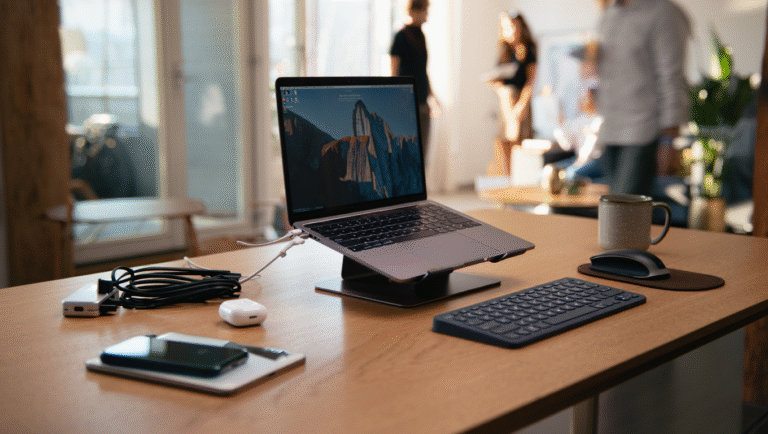
Ever found yourself wedged between a window and a plastic armrest at an airport, squinting at your laptop while your wrists go numb? Or maybe you’ve tried powering through a spreadsheet at a noisy café table, only to realize your charger’s at the bottom of your suitcase, wrapped around a half-eaten granola bar. Welcome to the glamorous, sometimes chaotic world of remote work. But here’s the good news: you don’t need a suitcase full of gear to stay productive on the move. In fact, you can build a complete, ultra-light mobile office that fits in a backpack and sets up in under 5 minutes.
The 5-Item Office: What Actually Works?
I’ve spent years fine-tuning my remote setup—across airports, co-working spaces, and even park benches. After testing (and discarding) a small mountain of “must-have” gadgets, I keep coming back to a ruthless, 5-item essentials list:
- Laptop (lightweight, all-day battery)
- Laptop stand (ultra-slim, foldable)
- Compact keyboard & mouse (wireless, travel-size)
- Mini charger (USB-C, fast charging, tiny footprint)
- Privacy screen (magnetic, packs flat)
That’s it. No portable printer, no external monitor, no USB-powered mug warmer. Just what you need to be fast, focused, and flexible—whether you’re taking a call from a hostel lounge or blasting through emails at a picnic table.
Case Study: The “Airport Sprint” Setup
Last fall, stuck in a layover with only 20 minutes to review a technical design doc, I put this kit to the test. Here’s what happened:
With my backpack as a desk, I set up the foldable stand, dropped my laptop on it, paired the compact keyboard and mouse, snapped on the privacy screen, and plugged in the charger—all in about 90 seconds. I finished the doc before my flight started boarding. No sore neck, no battery panic, and nobody peeking over my shoulder.
That’s the beauty of a truly mobile setup: speed + comfort + privacy, anywhere.
Building Your Ultra-Light Office: Step-by-Step
1. Pick Your Laptop: Go Light, Go Long
I’ve tried MacBooks, ThinkPads, and more Chromebooks than I care to admit. The sweet spot: sub-3 lb (1.4 kg) weight and at least 8 hours of real-world battery. Don’t obsess over specs—obsess over portability and battery health. My pick? MacBook Air M2 (13″) or Lenovo X1 Carbon. Both weigh about 2.7 lbs (1.2 kg).
2. Foldable Laptop Stand: The Unsung Hero
Your neck (and future chiropractor) will thank you. Look for a stand that:
- Folds flat (less than 0.5″ thick)
- Weighs under 1 lb (450g)
- Works for both sitting and standing setups (bonus points!)
I swear by the Roost Stand (5.8 oz/165g), but Nexstand is a solid, lower-cost alternative.
3. Compact Keyboard & Mouse: Your Hands Will Notice
Don’t use your laptop keyboard long-term if you value your wrists. I use the Logitech MX Keys Mini (10.4 oz/295g) and Logitech Pebble M350 (2.7 oz/76g). Both fit in a small pouch and last weeks on a single charge.
4. Tiny Charger: The Pocket Powerhouse
Forget the brick that came with your laptop. A GaN USB-C charger (like Anker Nano II 65W) is half the size, charges everything (laptop, phone, headphones), and weighs just 3.4 oz (95g). Don’t forget a short, high-quality USB-C cable.
5. Privacy Screen: Your Security Blanket
Ever been side-eyed by a stranger as you write up a performance review? Magnetic privacy screens snap on/off in seconds and block most side views. My go-to is the 3M Gold series. Adds less than 2 oz (55g) to your bag.
Ultra-Light Office: The Real-World Checklist
| Item | Model / Example | Weight | Pro Tip |
|---|---|---|---|
| Laptop | MacBook Air M2 / Lenovo X1 Carbon | 2.7 lbs (1.2 kg) | Keep battery above 30% for long flights |
| Laptop Stand | Roost / Nexstand | 0.36 lbs (165g) | Keep in quick-access pocket |
| Keyboard | Logitech MX Keys Mini | 0.65 lbs (295g) | Shortcut keys = time saved |
| Mouse | Logitech Pebble M350 | 0.17 lbs (76g) | Silent clicks for public spaces |
| Charger | Anker Nano II 65W | 0.21 lbs (95g) | One charger for all devices |
| Privacy Screen | 3M Gold | 0.12 lbs (55g) | Removable, reusable |
Tools & Links: Grab-and-Go Recommendations
- MacBook Air M2 / Lenovo X1 Carbon
- Roost Stand / Nexstand
- Logitech MX Keys Mini
- Logitech Pebble M350
- Anker Nano II 65W
- 3M Gold Privacy Filter
Final Thoughts
Traveling light doesn’t mean compromising on comfort or productivity. With just five well-chosen tools, you can work anywhere—without looking (or feeling) like you dragged your whole desk through TSA. My rule: if it doesn’t fit in my backpack, it doesn’t come with me. Give this setup a try on your next trip, and see how much time and hassle you save.
Some links may be affiliate. You pay the same price, and this blog may earn a small commission. Thanks for supporting real-world tips and coffee breaks!