Quiet Tech & Minimalism
If you’re anything like me, you’ve had at least one “what is all this stuff?” moment in your workspace. Cables you couldn’t name, a keyboard that clacks like a typewriter, gadgets you bought “just in case,” and a desktop lamp that makes everything look a little too yellow. It sneaks up on you, especially if your home office is also your living room, your dining nook, or—on the road—a slice of Airbnb countertop. Over time, clutter isn’t just visual; it’s acoustic, digital, and mental. And the more remote and mobile you get, the more it matters.
Why “Quiet Tech” Matters (and Why Minimalism Isn’t a Fad)
Let’s get the clichés out of the way: minimalism isn’t about living with nothing. It’s about living better with less. When it comes to tech, this means curating tools that disappear into your routine—not the other way around.
“I used to think more gear meant more productivity. Turns out, less noise (literally and figuratively) means more focus.”
Here’s what I noticed after a month of intentionally switching to “quiet tech”:
- Lower stress levels—fewer wires and blinking LEDs helped me focus, even with kids in the house.
- Better audio environment—silent mice and low-profile keyboards meant fewer distractions for me (and for my family on calls).
- Improved lighting—a high-CRI lamp made a bigger difference to my mood and Zoom calls than I would’ve guessed.
Case Study: From Cluttered Desk to Calm Command Center
Six months ago, my “mobile office” fit into a backpack… barely. Here’s a snapshot of what I carried:
- Full-size mechanical keyboard (loud & heavy)
- Standard wireless mouse (clicky, chunky)
- Bulky over-ear headphones (great sound, zero portability)
- Cheap desk lamp (flickery, harsh light)
- A spiderweb of USB cables and adapters
It worked. But it wasn’t quiet. Every keypress echoed. Every click was a mini drumbeat. My lamp made everything look tired. My backpack weighed a ton. And—I’ll be honest—half of those cables were a mystery to me.
What Changed?
I made a rule: Every item in my setup had to justify its place by improving focus, reducing noise, or saving space. Here’s how I broke it down:
- Swapped mechanical keyboard for a low-profile, silent key one (Keychron K3, brown switches, ~70% quieter).
- Switched mouse to Logitech M650 Silent (~90% fewer click noises than my old model).
- Replaced headphones with compact, noise-canceling earbuds (Sony WF-1000XM4—tiny, but still powerful).
- Upgraded lamp to a high-CRI LED (BenQ ScreenBar—no glare, accurate colors).
- Added cable management (Velcro ties, magnetic clips, one USB-C dock for everything).
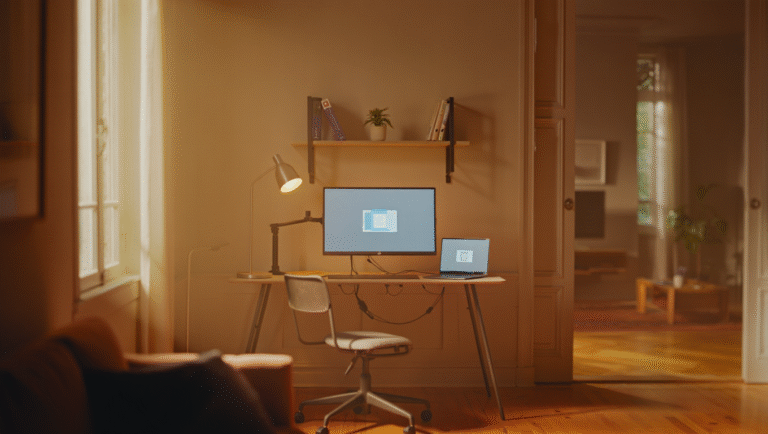
This wasn’t about buying the fanciest gear. It was about choosing less noise and less stuff. The result? My workspace got quieter, lighter, and easier to reset after work—or after family dinner.
Step-by-Step: Your 30-Minute Declutter & “Quiet Tech” Upgrade
- Set a timer for 30 minutes. No distractions, just focus on your workspace.
- Remove everything from your desk. Yes, everything.
- Sort gear into 3 piles: Keep, Replace, Donate/Sell.
- Wipe down your desk. This is the “blank slate” moment.
- For each item, ask: Does this help me focus or make my work easier? If not, move it to Replace or Donate/Sell.
- Rebuild your setup with only the Keep pile. Notice the difference in noise, space, and mental energy.
- Label or tie up cables with Velcro or magnetic clips. Route everything through one hub if possible.
- Check your lighting. Is it flicker-free and color-accurate? If not, consider a high-CRI lamp (see below).
- Test your keyboard and mouse. If they’re loud or bulky, add them to your Replace list.
- Take a photo. Compare before and after. If it doesn’t look or feel calmer, repeat steps 2-5.
Keep or Replace: Minimalist Tech Table
| Item | Keep | Replace With |
|---|---|---|
| Keyboard | Low-profile, silent (e.g. Keychron K3, Logitech MX Keys Mini) | Mechanical, loud, full-size |
| Mouse | Silent click (Logitech M650, M330 Silent Plus) | Standard clicky mouse |
| Speakers/Headphones | Compact, noise-canceling earbuds or flat speakers | Bulky headphones, desktop speakers with subwoofer |
| Lamp | High-CRI LED, adjustable (BenQ ScreenBar, Philips Hue Go) | Cheap LED, harsh light, no color accuracy |
| Cable Management | Velcro ties, magnetic clips, USB-C dock | Loose cables, multiple adapters |
| Extras | One small plant, notebook, water bottle | Desk toys, old chargers, unused gadgets |
Favorite Tools & Links
- Keychron K3 (low-profile mechanical, but quiet): keychron.com
- Logitech M650 Silent (the best for shared spaces): logitech.com
- BenQ ScreenBar (desk lamp for small/crowded desks): benq.com
- Velcro cable ties (life-changing, really): amazon.com
- Magnetic cable clips: amazon.com
- USB-C dock (any reputable brand: Anker, CalDigit, etc.)
- High-CRI lamp tip: look for 90+ CRI rating for best color accuracy.
Bonus: Quick Desk Reset Checklist (15 Minutes)
- Wipe down surface, monitor, and keyboard
- Rewind cables and secure with ties
- Put away unused gear (drawers or a box)
- Adjust lamp for natural color and no glare
- Keep just your essentials at arm’s reach
- Step back and notice: Does it feel quieter?
Final Thoughts: Why Fewer, Better Tools Win
If you’re tempted to add “just one more” gadget, try subtracting instead. The cumulative effect of a quiet, uncluttered setup isn’t just a cleaner desk—it’s a calmer mind and sharper focus. You’ll probably work faster, too (or at least have more space for coffee).
And if you want a little challenge, try the 30-minute declutter this week. You might be surprised what you don’t miss.
Some links in this post may be affiliate. If you click and buy, the price stays the same, but I may earn a small commission that supports this blog’s coffee habit and hosting fees.