Single-Monitor Developer Desk: $500 Build
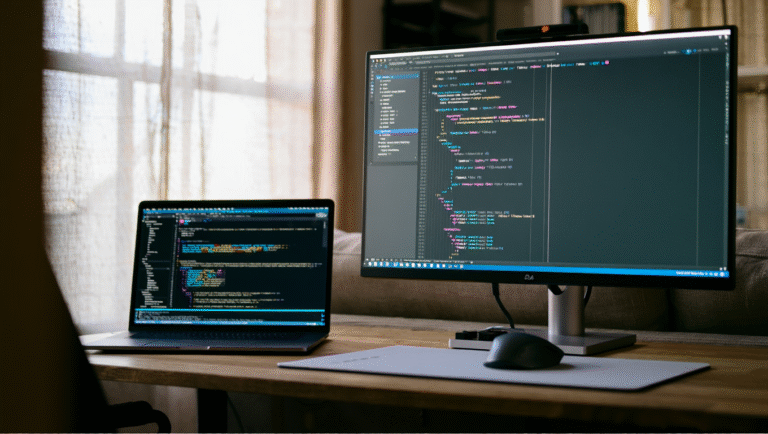
Let’s face it: not everyone needs a triple-ultrawide spaceship cockpit to write good code. Sometimes, all you want is a focused, uncluttered, and actually affordable developer desk—especially if you’re remote, space-conscious, or moving around. I’ve spent years hopping between Airbnb tables, cramped rentals, and coworking nooks, so I know the pain of overcomplicated setups and cable spaghetti. Here’s my honest take on building a single-monitor developer desk for under $500, with all the tools, parts, and lessons I’ve picked up along the way.
The Case for Simplicity: Why One Monitor?
Let me get this out of the way—the one-monitor life isn’t for everyone. If you’re juggling ten dashboards or orchestrating a Kubernetes cluster while editing video, you’ll want more screens. But for most developers, especially those who value deep work and minimal distractions, a single quality monitor is enough.
Fun fact: My best debugging streaks happened when I ditched the extra monitors, stopped tab-hopping, and focused on one thing at a time.
Plus, keeping it simple means less money spent, fewer cables, and way less time fiddling with monitor arms and weird adapters. If you’re on a budget or just want to keep things tidy, here’s how I’d do it for under $500—using gear I’ve tested or trust.
Real-World $500 Developer Desk: The Parts List
Here’s a no-nonsense list of what you’ll need. Prices are from Amazon and IKEA (US) as of June 2024. If you already own something—like a decent keyboard or laptop—swap it in and save more.
| Item | Model/Option | Approx. Price | Notes |
|---|---|---|---|
| Monitor | Dell P2422H 24” IPS 1080p | $180 | Excellent ergonomics, height/tilt/rotation, built-in USB hub |
| Desk | IKEA LINNMON Tabletop + ADILS Legs | $60 | Simple, 47” width, easy to move |
| Chair | FlexiSpot Ergonomic Task Chair | $99 | Surprisingly comfortable for the price |
| Monitor Arm | VIVO Single Monitor Mount | $40 | Frees desk space, easy to adjust |
| Keyboard | Logitech K380 Bluetooth | $30 | Light, reliable, portable |
| Mouse | Logitech M720 Triathlon | $40 | Great battery life, multi-device |
| Cable Management | Under-desk tray + velcro ties set | $20 | Trays are a game-changer! |
| Lamp | BenQ e-Reading LED Desk Lamp | $30 | Reduces eye strain |
| Total | $499 | ||
What About the Computer?
I’m assuming you’re bringing your own laptop or desktop. If not, check out refurbished ThinkPads or Mac Minis for $300–$400, but that’s a different post. The goal here is the best possible workspace, not a new computer.
Step-by-Step: Assembly & Ergonomics
Here’s how I’d set this up in 15 minutes, even if you’re in a rental or just moved in:
-
Assemble the desk and chair.
Tip: IKEA’s ADILS legs are foolproof—attach four screws per leg, done. Use a cordless screwdriver if you want to finish before your coffee’s cold. -
Mount the monitor arm and attach the monitor.
Set the monitor so the top edge is at or just below eye level. This saves your neck and shoulders. -
Place keyboard and mouse directly in front.
Keep elbows at about 90 degrees. Adjust the chair height, not the desk, if possible. -
Install the cable tray underneath the desk.
Route power strips, chargers, and cables through it. It keeps everything off the floor and out of sight. -
Bundle and label cables with velcro ties.
Pro move: Use color-coded ties for power vs. data cables, so you don’t unplug the wrong thing mid-Zoom call. -
Set up the desk lamp to the side, not in front.
This avoids glare on your screen and lights up your keyboard.
My Quick Ergonomics Checklist
- Screen: Arm’s length away, top edge at eye level.
- Chair: Feet flat, knees at 90°, back supported.
- Desk: Clear except for essentials.
- Lighting: No direct light on screen.
- Cables: Off the floor, organized, labeled.
Upgrade Path: Where to Spend if You Have More
Say you land a bonus or your employer gives you a stipend—here’s how to get the best return for your next $100–$200:
- Upgrade the monitor — A 27” 1440p like the Dell S2721D is a huge quality-of-life boost. Expect $220–$250.
- Get a sit-stand desk — FlexiSpot’s basic electric frame is $150–$200 and fits the same IKEA top.
- Splurge on a real ergonomic chair — Used Steelcase or Herman Miller can be found for $200–$300 on Craigslist or Facebook Marketplace.
- Mechanical keyboard — Keychron K2 or Logitech MX Keys, $60–$100, if you type a lot.
But honestly, you don’t need these to get real work done. The setup above will get you 90% of the way there, and your back and wrists will thank you.
Essential Tools and Links
- IKEA LINNMON/ADILS Desk
- Dell P2422H Monitor
- VIVO Monitor Arm
- Logitech K380 Keyboard
- Logitech M720 Mouse
- Cable Tray & Organizer
- FlexiSpot Chair
- BenQ e-Reading Lamp
Bonus: Real Life Story
A few months back, I tried working from a rental with one of those “trendy” glass desks and a bouncy stool. It looked cool in photos—but my wrists and back hated me by day three. The next day, I spent $120 at IKEA and got the LINNMON with a basic chair. It was night and day. No more squeaks, wobbles, or back pain. Sometimes, the boring option is the best one.
Takeaway? Don’t chase aesthetics or YouTube setups. Go for comfort, stability, and what fits your space (and budget). You’ll code better, and your future self will thank you.
Some links may be affiliate. You pay the same price, and this blog may earn a small commission.